When you give a client white-label access, they can connect their clients to you for service delivery while you work invisibly in the background.
White-label features let your clients rebrand Bripes under their own domain and logo. When you give a client white-label access, they can connect their clients to you for service delivery while you work invisibly in the background.
How White-label works
White-label creates a three-way relationship between you, your client (the reseller), and their client (the end user).
The basic flow: Your client buys services from you at your rate. They resell those services to their client at their own rate. They activate white-label and connect their client to your workspace. When their client requests work, you fulfill it. When you deliver, it appears as coming from your client. Your client stays in the middle, managing both relationships.
Real example: You're a design agency. Agency A buys one website design project from you for $2,000. Agency A sells that same website to their client for $4,000, keeping the $2,000 difference.
Agency A activates white-label and gives their client access to a branded portal at portal.agencya.com with Agency A's logo. The client creates a project requesting website design. You receive the project in your workspace and start working on it. When you ask questions or request content, the client sees those messages as coming from Agency A. You deliver the website design, and it appears to the client as a delivery from Agency A. The client never knows you exist.
Activating white-label
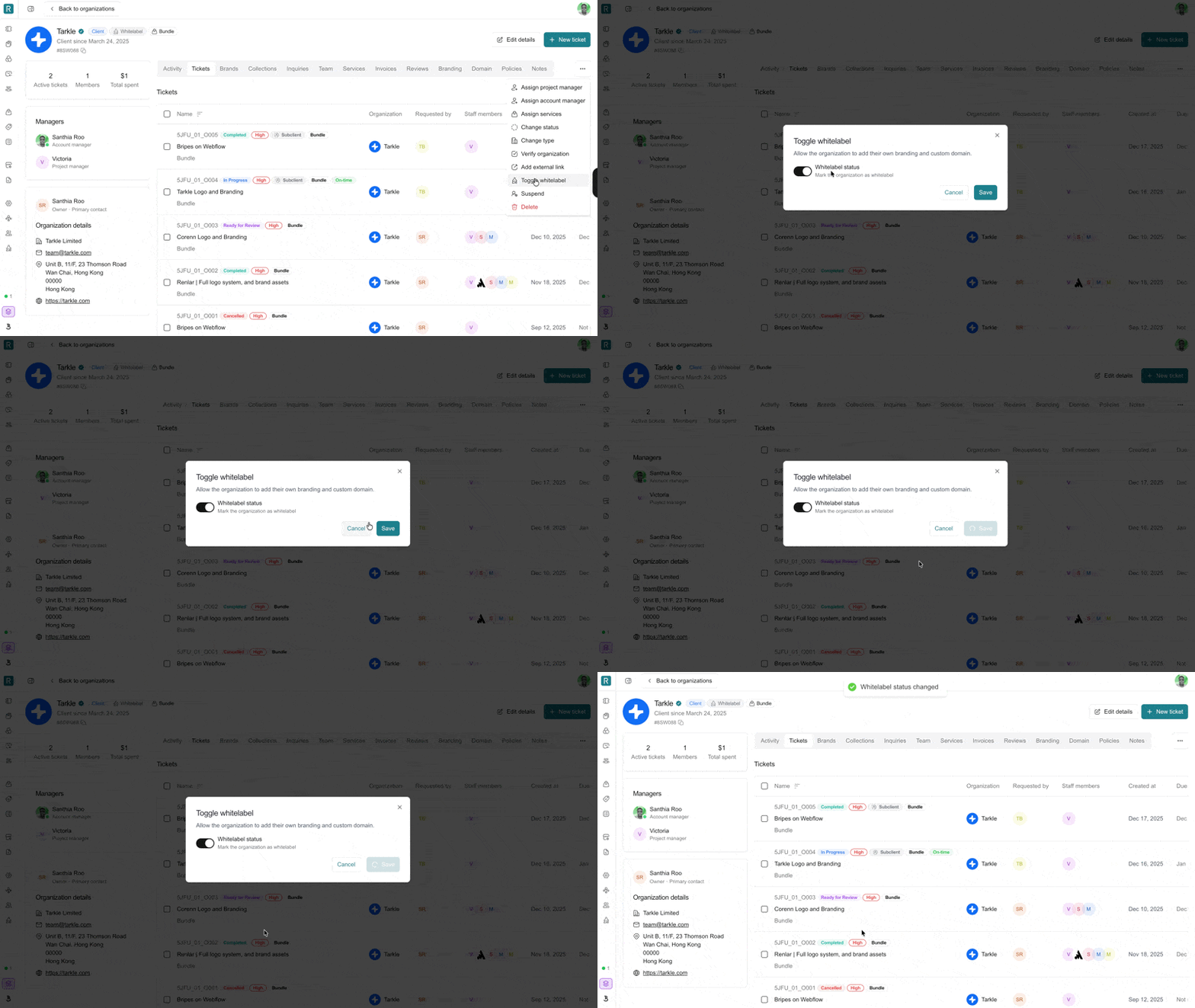
Go to CRM in your sidebar and click on the client you want to give white-label access to. Click the three dots menu in the top right corner and select Toggle whitelabel.
Once activated, your client can set up their custom domain, upload their logo, customize their branding colors, and start inviting their clients to the portal.
What your white-label clients can do
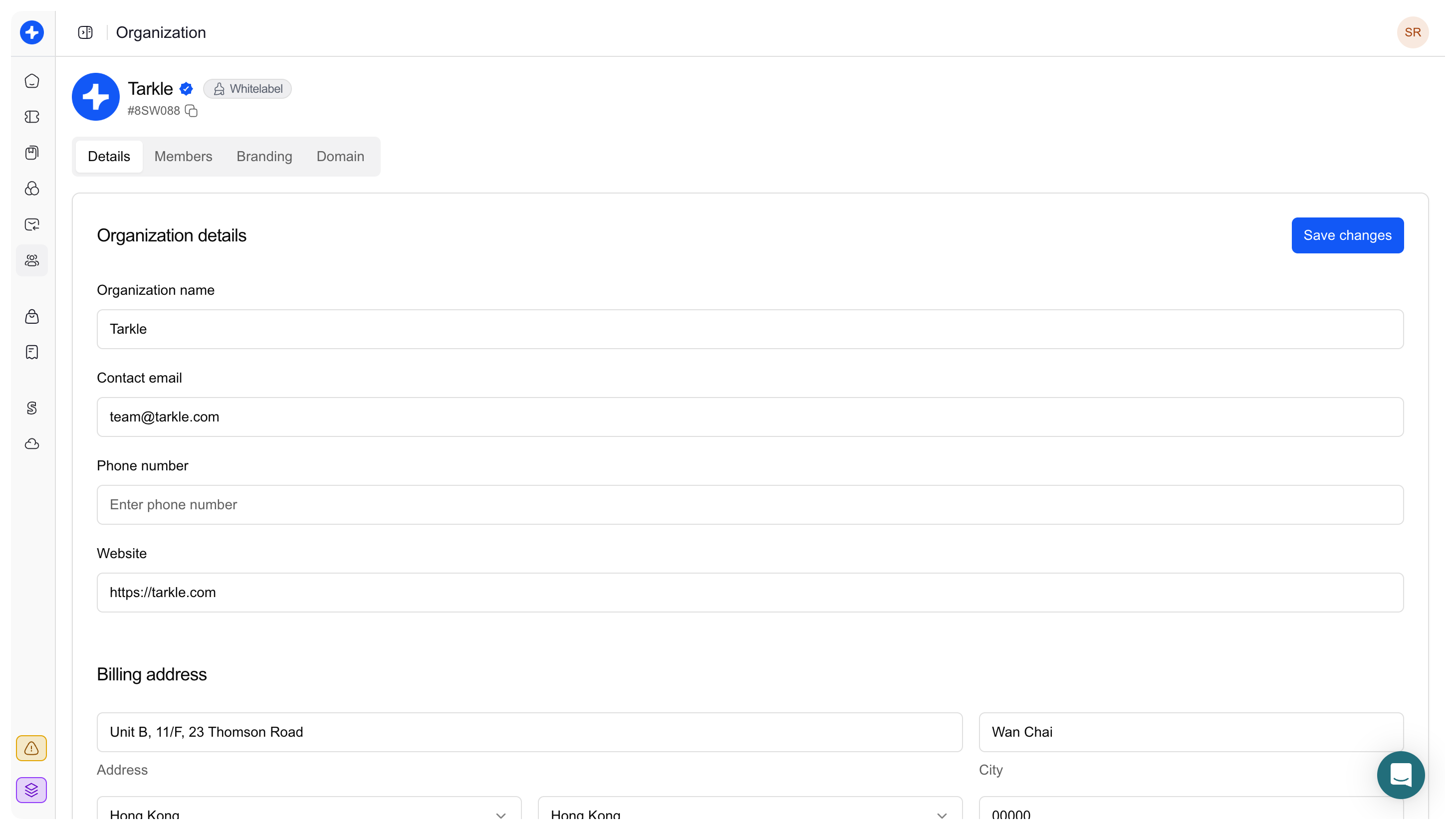
Set up custom branding Your client can configure their own domain (like portal.theiragency.com), upload their logo, and customize brand colors. Everything their clients see will be branded as your client's company, with no mention of you or Bripes.
Invite their clients Once branding is set up, your client can invite their own clients to the portal. These end clients see only your client's branding and believe they're working directly with your client's team.
Create projects for services Your client can create projects based on the services they purchased from you. For example, if they bought graphic design capacity, they can create graphic design projects for their clients. These projects get assigned to you for fulfillment.
Manage communication Your client sits in the middle of all communication. When their client sends a message, both you and your client see it. When you respond, your client can review it before it goes to their client. All messages appear to come from your client's company.
Understanding service capacity
White-label is built around service capacity, not individual transactions. Your client doesn't buy "one logo" from you. They buy capacity to deliver logo design services to their clients.
How capacity works Let's say you offer a graphic design service that includes 2 concurrent projects. Agency A buys this service from you for $1,295/month. Agency A can now offer graphic design to their clients at whatever price they choose - $2,000/month, $3,500/month, however they want to package it.
Agency A's clients request graphic design work through the white-label portal. You fulfill those requests as they come in, working on up to 2 projects at a time (the capacity Agency A purchased). Agency A manages their own billing with their clients completely separately.
Services you can white-label Any service you offer can be sold through white-label - graphic design, website development, video editing, copywriting, social media content, branding, app design, or any other creative or technical service you provide.
How communication flows
All communication in white-label projects is three-way, but appears two-way to the end client.
When the end client sends a message The client types their message in the branded portal. Your client (the reseller) sees the message in their dashboard. You see the message in your workspace. The message appears to you as coming from "Client Name via Agency A."
When you reply You type your response in your workspace. Your client sees your response first and can review it, edit it, or approve it. The response then goes to the end client. The message appears to come from your client's company, not from you.
Your client's role Your client acts as the bridge in every conversation. They see all messages between you and their client. They can jump into conversations, add their own comments, approve deliveries before they reach their client, or request changes from you before the client sees anything.
White-label vs Regular collaboration
It's important to understand what white-label does and doesn't include.
What white-label provides White-label is about service delivery and project collaboration. It gives your client a branded portal where their clients can request work, communicate about projects, review deliveries, and provide feedback. All of this happens under your client's branding while you work invisibly in the background.
What white-label doesn't include White-label does not handle payment processing, invoicing, or subscription billing. Your client manages their own billing with their clients completely outside the platform. They might use Stripe, send invoices, require upfront payment, or use any other payment method they choose. The white-label portal handles the work, not the money.
How services and payment work As an agency using Bripes, you create your services at https://app.bripes.io/services. Your white-label clients buy those services from you - this purchase is what gives them access to create project requests.
For example, Renlar sells a Graphics plan that includes unlimited ticket and project requests with 2 concurrent projects at a time. When Agency A buys the Renlar Graphics plan, they get access to white-label features and can invite their clients to submit projects. When Agency A's client requests a project, Agency A needs to have an active service with you (payment recorded either manually or via Stripe) to allow that project submission.
Two separate settings White-label branding can be toggled on or off independently - this just controls whether your client gets their own domain and logo. But to actually create and submit project requests, your client must have purchased a service from you. Service access is what enables project requests. White-label branding is what makes those requests appear under your client's brand.
Sub-account limits
Your Bripes Agency plan includes 20 sub-accounts. Each sub-account can be a separate white-label reseller with their own domain, branding, and client base.
You can have Agency A using one sub-account to serve their clients, Agency B using another sub-account for their clients, and so on - up to 20 different agencies all working under their own brands while you fulfill the work.
If you need more than 20 sub-accounts, contact us to discuss custom pricing.
Testing white-label
Before activating white-label for paying clients, we recommend testing it with a dummy account.
Create a test organization in your CRM and toggle white-label for that organization. Set up test branding and a test domain. Create a few test projects as if you're one of their clients. Experience the full workflow from all three perspectives - as the service provider, as the reseller, and as the end client.
This helps you understand exactly what your clients will see and do, and what their clients will experience, before you activate it for real business relationships.
Managing multiple white-label clients
All projects from all your white-label clients appear in your main workspace. You can filter by organization to see work from specific clients, or view everything together.
Each white-label client only sees their own workspace and their own clients. Agency A cannot see Agency B's projects or clients. Everything is completely isolated between different resellers.
If you need to suspend or remove a white-label client's access, go to their organization page and either toggle white-label off or suspend their account. This immediately removes their access and their clients' access to the portal.
Common questions
Can I turn off white-label after activating it? Yes. Go to the organization page in your CRM and toggle white-label off. This removes their custom domain and branding, but doesn't delete their account or projects.
Can a white-label client's end customer contact me directly? No. All communication goes through the branded portal and appears to come from your client. The end customer has no way to know you exist or contact you directly.
What if my client doesn't pay me? You can suspend their account, which removes their access and their clients' access to the portal. You control the relationship completely from your side.
Can white-label clients create their own white-label resellers? Not currently. White-label works one level deep. Your clients can serve their clients, but those clients cannot create their own sub-portals.
What's the difference between toggling white-label and purchasing a service? Toggling white-label gives your client custom branding - their own domain and logo. Purchasing a service gives them capacity to create project requests. They need both: service purchase to submit projects, and white-label toggle to make those projects appear under their brand.
How do I explain to my white-label client how this works? Send them this article. It explains the complete system from both perspectives.